WhatsApp deep links: a complete setup guide in 2026
Create a WhatsApp deep link with the right number and message, add it to your website, and track whether the conversations lead to sales or bookings.

TL;DR: A WhatsApp deep link opens a chat with your business. Start with https://wa.me/PHONENUMBER, using the country code and digits only. Add ?text=YOURMESSAGE if you want to prepare a message for the customer. Put the link where an unanswered question could cost you a sale or booking, test it on a phone and computer, then track both clicks and completed outcomes.
Nobody wants to save a phone number just to ask whether a class has space, a product will arrive by Friday, or a room is free for two nights. A deep link removes that chore. One click opens the right WhatsApp chat with the context already written.
More than 3 billion people use WhatsApp. Your customer probably understands the channel already. The part you control is how easy it is to start the conversation and what happens after they press Send.
What's a WhatsApp deep link?
A WhatsApp deep link, also called a click-to-chat link, opens a conversation with a specific WhatsApp number. The customer does not have to add the business to their contacts first.
The basic format is:
https://wa.me/PHONENUMBERYou can prepare a message too:
https://wa.me/PHONENUMBER?text=YOURMESSAGEThe message is placed in the text box. WhatsApp still asks the customer to send it, which prevents a link from silently sending a message on their behalf.
On a phone, the link opens WhatsApp. On a computer, it opens the available web or desktop experience. WhatsApp documents the format in its official click-to-chat guide. You may also see older links that use api.whatsapp.com; wa.me is shorter and easier to manage.
How do you create a WhatsApp deep link?
You can build one by hand in a few minutes. The two details that cause most failures are a badly formatted number and a message that was not URL encoded.
1. Format the business number
Use the full international number, including the country code, then remove the plus sign, spaces, parentheses, and hyphens.
+52 55 2222 1234  →  525522221234
+1 555 123 4567   →  15551234567
+44 20 1234 5678  →  442012345678
The first link becomes:
https://wa.me/525522221234Use a number owned by the business. A link can remain on your website, old emails, and printed material for years, long after one employee changes roles.
2. Write a message that carries context
A blank chat makes the customer explain where they came from. A short prepared message gives your team the missing context: “Hi, is there space in the 6 p.m. Pilates class?” or “Hi, I have a question about this product.” Keep it editable and ask only for the detail needed to start.
3. Encode the message
Spaces and punctuation need URL encoding. For example:
Hi, I have a question about this product.Becomes:
Hi%2C%20I%20have%20a%20question%20about%20this%20product.The finished link is:
https://wa.me/525522221234?text=Hi%2C%20I%20have%20a%20question%20about%20this%20product.If you generate links in code, use your language's equivalent of encodeURIComponent() for the message instead of replacing spaces by hand. Open the finished link before you publish it and check the number and every word of the message.
How do you add a WhatsApp link in WordPress?
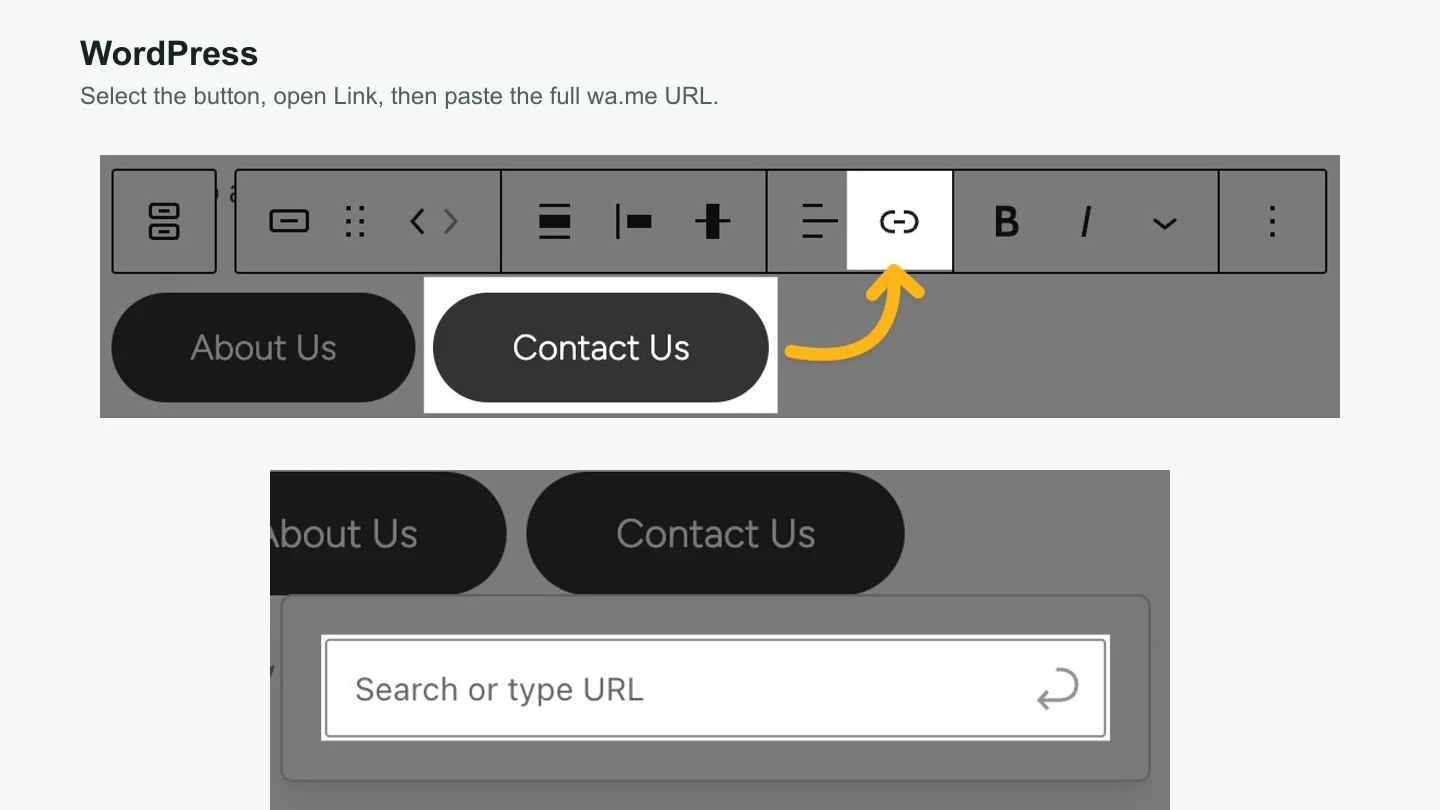
Open the page or post in the WordPress editor, insert a Buttons block, and write button text that matches the customer's task, such as “Check availability.”
Select the individual button, click the Link icon, paste the full wa.me URL, and press Enter. Update the page, then test the published button on a phone and computer. WordPress shows the same controls in its official button-link instructions.
If your site uses a page-builder plugin, the labels will differ, but the job is the same: find the button's URL or link field and paste the complete deep link.
How do you add a WhatsApp link in Wix?
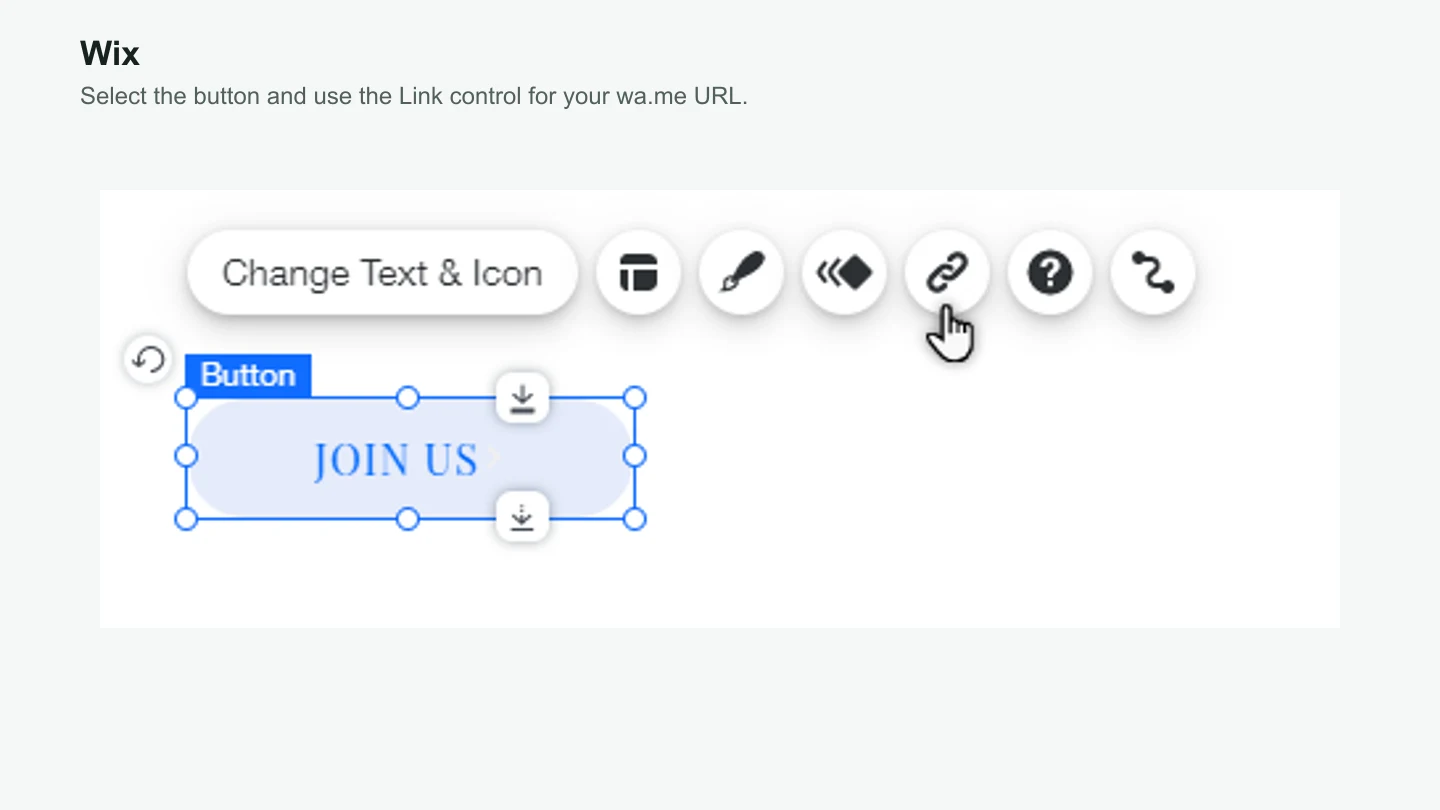
Select the button in the Wix Editor and click the Link icon. Choose Web Address, paste the full wa.me URL, and click Done. Publish the site and test the live button.
Wix's official guide to linking a button shows the control in the editor. If Wix rejects the URL, check for an unencoded space or punctuation mark before reaching for a link shortener.
How do you add a WhatsApp link in Shopify?
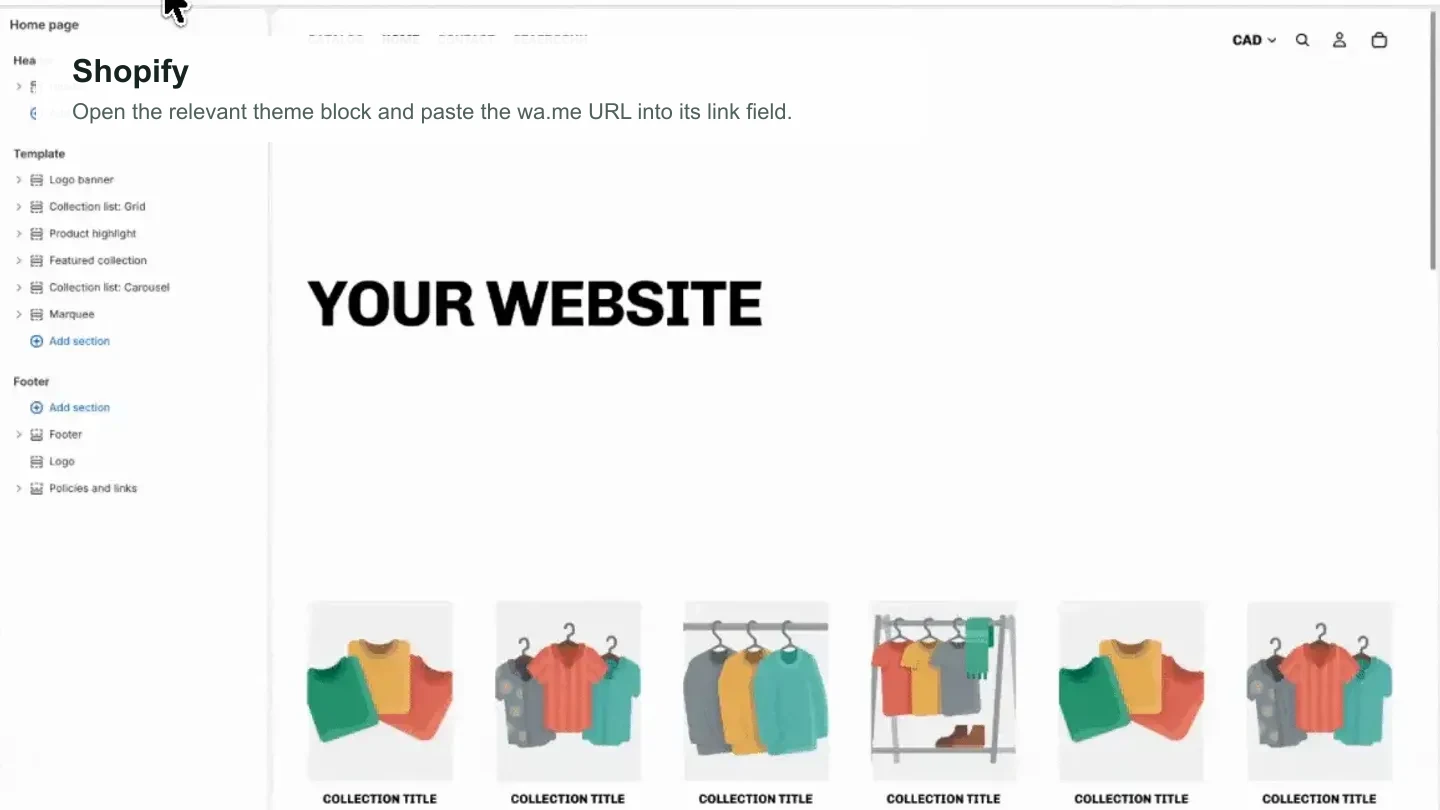
From Shopify Admin, open Online Store > Themes > Edit theme. Go to the product page, home page, or other template where the question appears. Select the section or block that contains the button, then paste the wa.me URL into its link field and save.
Shopify themes do not all expose the same blocks. If yours has no button-link field, add a Custom Liquid block with the HTML example below or ask the theme developer where that link belongs. Shopify's theme editor guide explains how sections and blocks are organized.
<a href="https://wa.me/525522221234?text=Hi%2C%20I%20have%20a%20question%20about%20this%20product.">
  Ask about this product
</a>
For a broader workflow that answers product questions and hands conversations to your team, read the Shopify WhatsApp AI agent guide.
How do you add a WhatsApp deep link to your Instagram profile?
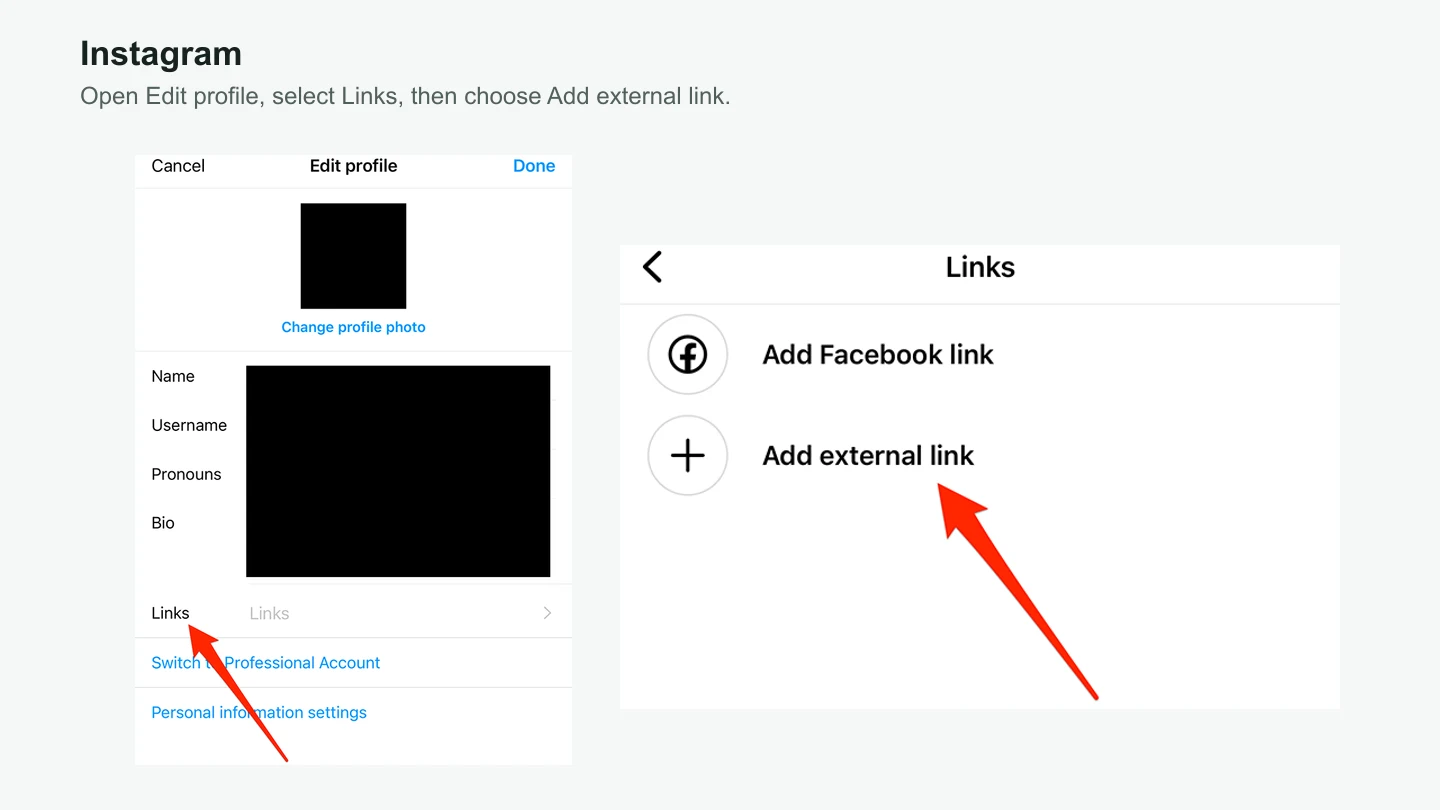
Open Instagram on your phone and go to your profile. Tap Edit profile, then Links, then Add external link. Paste the complete wa.me URL. If Instagram shows a title field, use a clear label such as “Chat with us on WhatsApp,” then tap Done. Instagram lists the same path in its profile links instructions.
Put the URL in Links, rather than typing it into the bio itself. The Links field makes it tappable. If your profile already has several destinations, keep WhatsApp near the top when a conversation is the quickest route to a sale, appointment, or booking.
Open the profile from another account and tap the published link. Check that it opens the right business number and prepares the intended message. A label that promises “Check availability on WhatsApp” sets a clearer expectation than “WhatsApp” by itself.
How do you add WhatsApp to Google Maps?
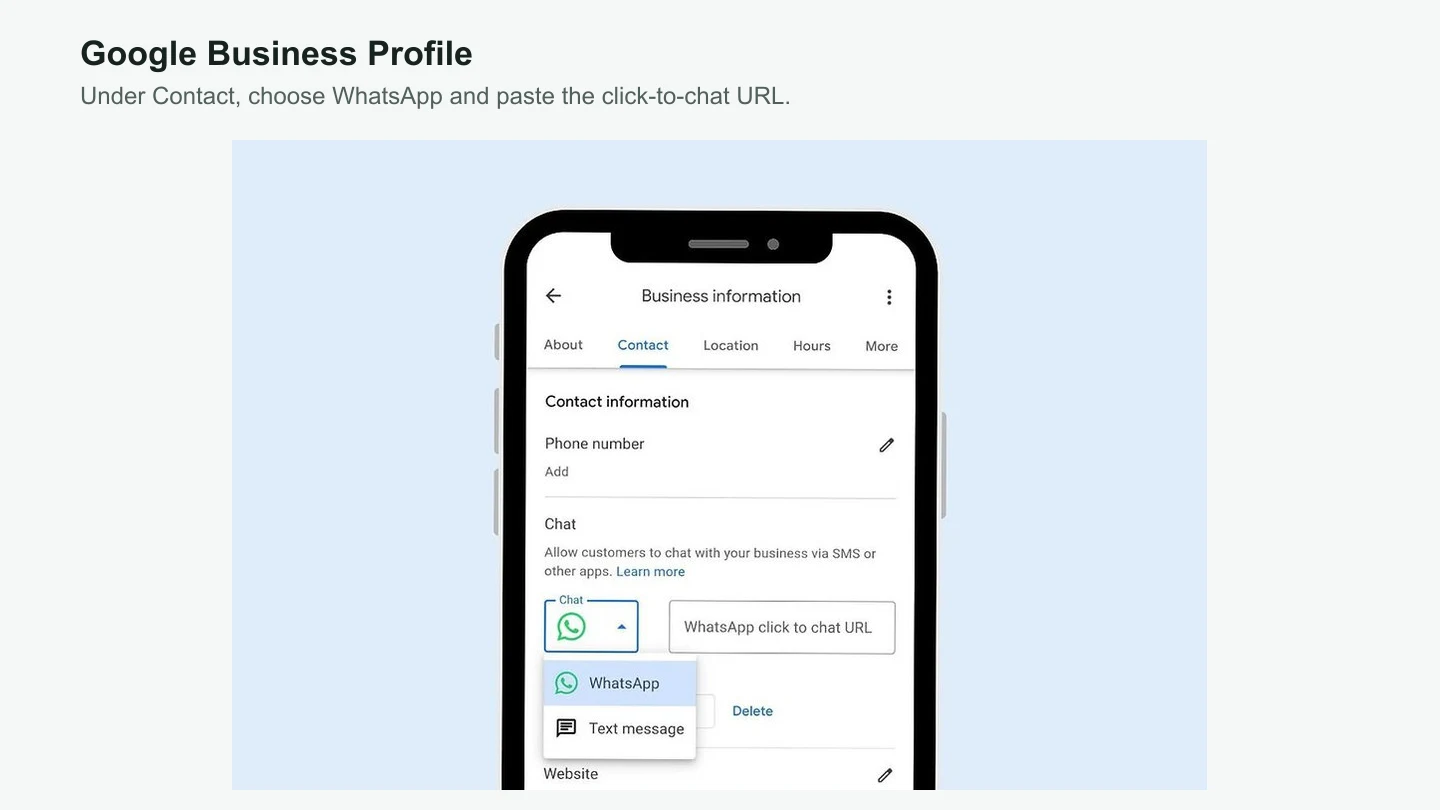
Google manages this through your Business Profile, even though customers find the chat option in Google Search or Maps. Sign in with an owner or manager account, find the business profile, and select Edit profile > Contact. Next to Chat, select the edit icon, choose WhatsApp, paste the full wa.me URL, and save.
Google only offers the Chat field to claimed and verified Business Profiles in supported regions. If the field is missing, confirm that you are editing the right location with the right account. Google's WhatsApp chat instructions explain the current eligibility limits.
For screenshots, troubleshooting, and the separate steps for adding Instagram to the same profile, use Visito's full guide to adding WhatsApp and Instagram to Google Maps.
Where's the best place to put WhatsApp deep links?
Add them where customers frequently ask questions and not finding an answer prevents a sale or booking. Pricing, availability, product, appointment, reservation, and checkout pages are better starting points than a generic button added everywhere.
The button copy should name the job. “Contact us” only names the channel. “Check availability” tells the customer what they can get done.
Use the same business number across placements, but give each one a different prepared message. When somebody writes from a product page, your team should already know which product prompted the question.
| Placement | Button text | Prepared message |
|---|---|---|
| Product page | Ask about this product | Hi, I have a question about this product. |
| Pricing page | Ask about pricing | Hi, I have a question about your pricing. |
| Appointment page | Book an appointment | Hi, I'd like to book an appointment. |
| Class schedule | Check class availability | Hi, is there space in this class? |
| Reservation page | Check my dates | Hi, I'd like to check availability for my dates. |
| Order email | Get help with my order | Hi, I need help with order 1234. |
Where else can you use the same link?
The same wa.me URL works anywhere that accepts a normal web link. Keep the number consistent and change the prepared message so you can recognize the source.
Add the link to appointment reminders, order confirmations, or service emails. Someone opening an order confirmation should arrive with “I need help with order 1234,” rather than a generic hello.
Use the link in the website, contact, or action-button field available to your Page. It can also be the destination for an ad when a conversation will answer the buying question faster than another landing page.
QR codes
Turn the link into a QR code for receipts, packaging, menus, signs, or event material. Scan a printed proof before producing the full batch. Small codes, glossy surfaces, and low contrast can make a correct link impossible to open.
How do you know if the link is working?
Track the click, then check whether the conversation produced the outcome you wanted. A high click count can still hide slow replies, unanswered chats, and customers who never complete the next step.
Set up a click event in GA4 or your analytics tool for each WhatsApp button. Compare those clicks with conversations started, qualified leads, appointments booked, orders supported, payments collected, and reservations completed.
Prepared messages make the source easy to recognize without forcing the customer to repeat it. Use a distinct message for each important placement. Avoid stuffing tracking codes into the customer's visible message; “Source: pricing-page-v2” reads like software talking to itself.
Look at conversion by placement, not clicks alone. Ten pricing-page chats that lead to four bookings are more useful than 100 home-page chats that go nowhere.
What should happen after the customer sends the first message?
A deep link opens the door. It does not answer the question, route the chat, or follow up. Decide who watches new messages, which hours your team covers, when a person should take over, and what the conversation should lead to.
If a customer clicks from your pricing page at 9:43 p.m. to ask about tomorrow's class, a reply the next morning may be too late. A shorter path into an unattended inbox has not fixed the buying problem.
For a small number of chats, one person using the WhatsApp Business app may be enough. When several teammates, automations, integrations, or proactive messages are involved, read the practical differences between the WhatsApp app and WhatsApp Business Platform and check the current WhatsApp Business Platform pricing.
Visito's WhatsApp AI agent can answer with approved business information and use supported integrations to check live prices or availability, qualify a lead, send a payment link, or create a booking. When a request needs a person, the team can continue in the shared inbox with the previous messages still visible.
If you are comparing providers, start with the workflow you need and test it end to end. These pages cover three common comparisons: Visito vs. Asksuite for hotel reservation sales, Visito vs. Manychat for social automation, and Visito vs. Wati for WhatsApp messaging. Our 2026 WhatsApp AI agent guide compares a wider shortlist.
Ready to test your first link?
Choose one page where customers already hesitate. Write a message that names the question, publish the link, and test it on a phone and computer. Then read the first ten conversations. You will learn more from those messages than from adding the same generic WhatsApp button to every page.
If customers get the answer and complete the next step, reuse the pattern on the next page. If they stall, fix the message, response time, or handoff before you add more traffic. Start with Visito for free when you want an agent to handle that first question and move the conversation forward.