WhatsApp Business API pricing in 2026: Meta fees and AI agent costs
A deep dive into WhatsApp Business API fees, Meta AI agent fees, and third-party alternatives.

TLDR
- Meta’s API fees depend on the message category and the recipient’s phone-number market. Your AI provider may charge separately.
- API service replies are free through September 30, 2026. From October 1, each business phone number gets 1,000 free service messages per month, then pays per delivered reply. Utility templates inside the 24-hour window also become chargeable.
- Incoming customer messages and manual one-to-one messages sent directly from the WhatsApp Business app remain free, including with coexistence. Replies sent through a connected platform follow API pricing.
- If a customer messages you through an eligible click-to-WhatsApp ad or Facebook Page button and you reply within 24 hours, that reply starts 72 hours of free message delivery. Advertising and AI costs still apply; API templates are required if the separate 24-hour customer service window closes.
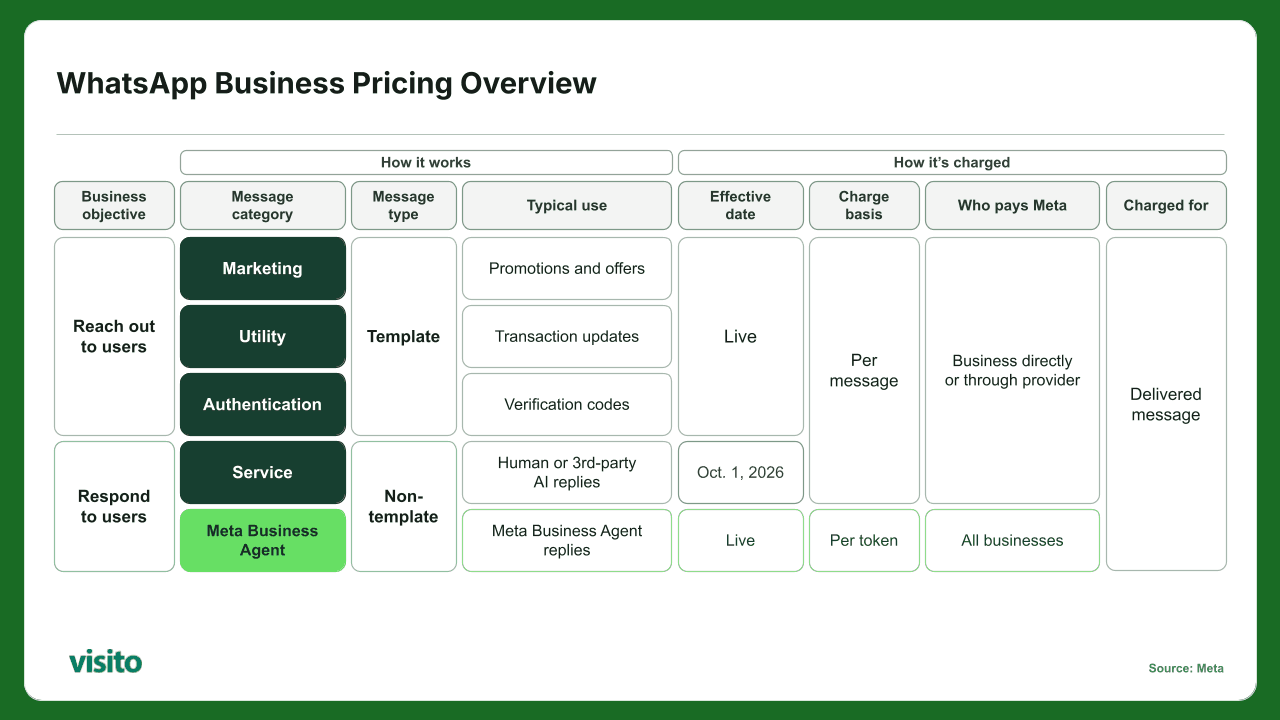
From October 1, 2026, service billing includes 1,000 free messages per business phone number each month. The free delivery exceptions in the TLDR also apply.
When we talk to potential customers who’re looking into using WhatsApp to automate customer conversations, they often have so many questions on the pricing structure of the WhatsApp Business ecosystem. Meta also recently rolled out native AI agents for WhatsApp, which is another point to clarify.
We’d like to clarify some of these questions for the community so you can pick the option that works best for your needs.
When thinking about WhatsApp Business pricing, there are effectively two types of messages: 1/ reaching out to a user, or 2/ responding to a user. In very simple terms, to reach out to a user for the first time, you need to use what’s called a template (more on this later). To respond to a user that’s already written to you, and while they’re inside the allowed time window, you don’t need a template. The normal customer service window lasts 24 hours. A separate 72-hour window of free message delivery applies when someone messages you through an eligible click-to-WhatsApp ad or Facebook Page button and you reply within 24 hours. There’s more on both later.
Within the first category (which is to reach out to a user), there are 3 categories of templates: marketing, utility, and authentication. They each cost slightly differently. In the second category, historically there was only a service category. Now, there’s also the Meta Business Agent category.
This all sounds really confusing (and it kind of is), but in practice it’s not that hard. Let me summarize this for you:
If you use the WhatsApp Business app on your phone, your manual one-to-one messages and replies remain free, including when the same number is connected to the API through coexistence.
Now, if you connect your number directly to the WhatsApp Business API, everyone can still send you a message and you’ll see it via your platform, like Visito. To contact a customer outside the 24-hour window since their last message, you need an approved template. Its content determines whether Meta classifies it as marketing, utility, or authentication. A reply typed by a person inside a connected platform follows API pricing, just like an automated reply.
This all gets quite annoying, which is why Meta launched WhatsApp Business Coexistence. That means you can continue to use your current WhatsApp Business app that’s on your phone without having to delete it or move the number. And you can connect the app to a 3rd party provider.
The last piece of the WhatsApp Business pricing puzzle is how automated messages to users are treated. So let’s say you run a hotel and want to send a booking confirmation to your guest after every reservation synced with Cloudbeds as your system of record. Well, you can do this manually, which is a pain, or you can set up an agent that checks your system in real-time and sends a WhatsApp message to the guest.
For an automated booking confirmation sent through the API outside an open customer service window, you’d use a utility template. This applies whether you connect directly to the API or use a provider through coexistence.
Meta charges templates according to the message category and the country associated with the customer’s phone number. As of today, September 7, 2026, ordinary API service replies are still free inside the 24-hour customer service window. From October 1, Meta will charge for delivered service replies after the first 1,000 free service messages per business phone number each month. The 72-hour free entry-point exemption still applies.
This guide is a deep dive on the WhatsApp Business API fees, AI agent fees from Meta, and your 3rd party alternatives.
What stays free?
These exemptions cover Meta’s message-delivery fees. Advertising, AI usage, and provider subscriptions may still have their own costs.
- Incoming customer messages: Meta does not charge for messages customers send to your business.
- Manual messages in the WhatsApp Business app: One-to-one messages and replies sent directly from the app stay free with coexistence. Messages sent through a connected platform follow API pricing. See Meta’s coexistence pricing rules.
- Qualifying click-to-WhatsApp conversations: If a customer messages you through an eligible ad or Facebook Page button and you reply within 24 hours, that reply starts 72 hours of free marketing, utility, authentication, and service message delivery. See Meta’s free entry-point rules.
- Monthly service allowance from October 1, 2026: Each business phone number receives 1,000 free service messages per month. Meta charges from the 1,001st delivered service message; unused allowance does not roll over. This allowance applies to service messages, including human and third-party AI replies via the API. See Meta’s published pricing update.
What is the WhatsApp Business API?
The official name is the WhatsApp Business Platform, although almost everyone still calls it the WhatsApp Business API.
The platform connects WhatsApp with the systems a business already uses. For a hotel, that could mean a property management system, booking engine, payment platform, or shared team inbox. A Pilates studio could connect its class schedule, customer records, and booking software.
Once those connections are in place, the business can automate booking confirmations, send appointment reminders, retrieve live information, route conversations to the right person, or let an AI agent answer customers.
The Platform handles the WhatsApp connection. You still need a person or another piece of software to answer questions, check availability, or complete a booking. This is why you can end up paying Meta for the messages and a separate provider for the AI agent.
The free WhatsApp Business app is simpler. It lets you manage conversations from your phone or linked devices and includes tools such as a business profile, catalog, and greeting messages.
The WhatsApp Business Platform is designed for automation and connected business systems.
Some businesses use the app and Platform together through WhatsApp’s coexistence features. Availability and setup requirements depend on the business account, number, provider, and market.
How does Meta determine the pricing model?
Meta charges when a business message is delivered to a WhatsApp user. If the message isn’t delivered, Meta doesn’t charge the normal delivery fee.
Two things set the price:
- The message category
- The market associated with the recipient’s phone number
The second point causes plenty of confusion. WhatsApp pricing does not follow the physical address of the business.
Suppose a hotel operates in Madrid. When it sends a message to a guest with a Mexican number, Meta uses the Mexico rate. A Pilates studio in Mexico City pays the Spain rate when it writes to a client with a Spanish number.
Here are Meta’s published list rates in US dollars per delivered message for Spain and Mexico. The first table applies through September 30, 2026:
| Recipient market | Marketing | Utility | Authentication | Service through September 30, 2026 |
|---|---|---|---|---|
| Spain | $0.0707 | $0.0200 | $0.0200 | $0.0000 |
| Mexico | $0.0305 | $0.0085 | $0.0085 | $0.0000 |
From October 1, 2026, the following USD rates apply. Service rates apply after the monthly free allowance; messages within a qualifying 72-hour free entry-point window remain exempt.
| Recipient market | Marketing | Utility | Authentication | Service |
|---|---|---|---|---|
| Spain | $0.0707 | $0.0200 | $0.0200 | $0.0200 |
| Mexico | $0.0397 | $0.0085 | $0.0085 | $0.0085 |
The current rates are also available in Meta’s live WhatsApp Business Platform rate selector. The October figures come from Meta’s published rate cards effective October 1, 2026, checked September 7. Mexico’s marketing rate increases from $0.0305 to $0.0397 per delivered message; Spain’s marketing rate stays at $0.0707. The new rates take effect at midnight in the WhatsApp Business Account’s timezone. Meta can revise rates quarterly.
Meta also offers volume discounts for utility and authentication messages. These discounts work in tiers. Once you cross a threshold, the lower price only applies to the messages inside the new tier. It does not reduce the price of all the messages you sent earlier that month.
From October 1, each business phone number receives 1,000 free service messages per month. Unused allowance expires at the end of the month. Service messages have no volume discounts; the free allowance is separate from the utility and authentication volume tiers.
What are the different types of messaging categories?
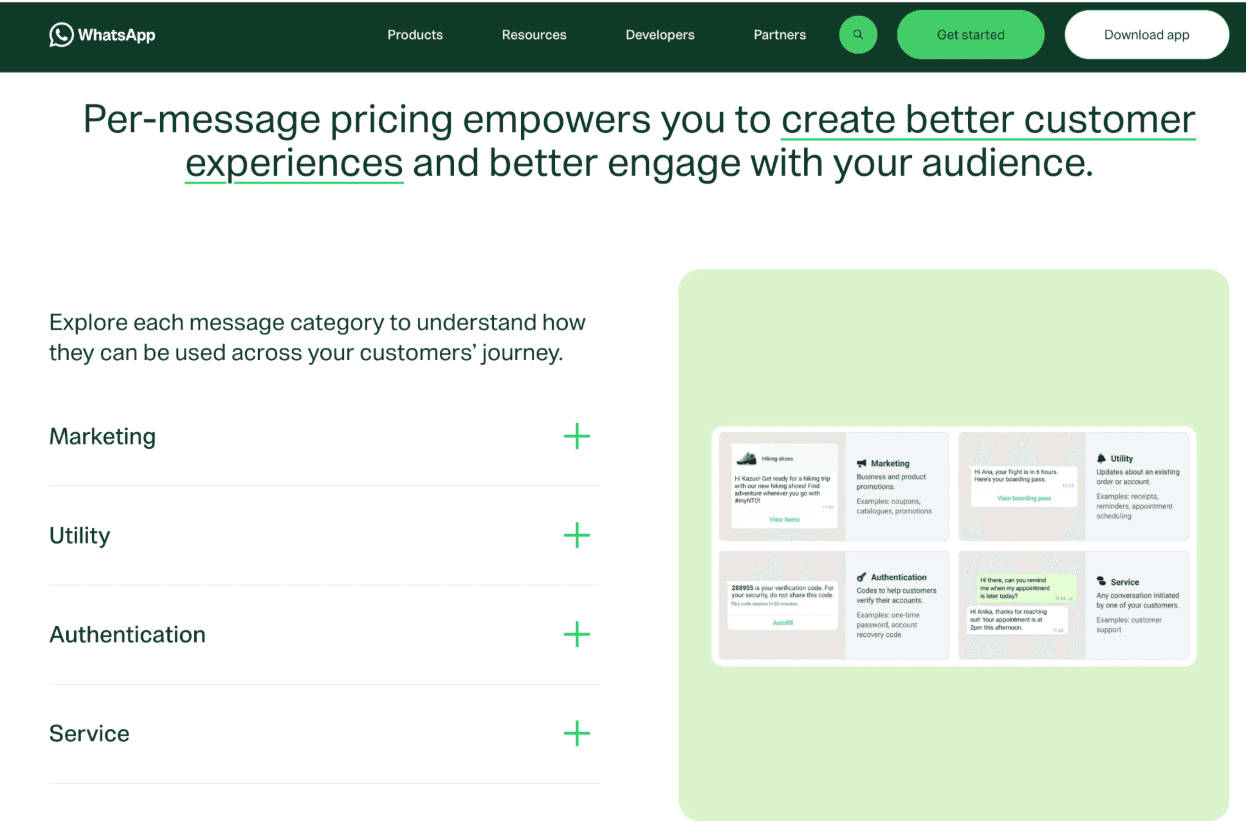
WhatsApp divides ordinary Platform messages into four different categories: marketing, utility, authentication, and service. The category defines when a message can be sent and how Meta prices it.
Marketing messages
Marketing templates promote an offer or move a customer toward a sale.
A hotel might send a discounted extra-night offer, an abandoned-booking reminder, or an invitation to return. A Pilates studio could promote a class package or announce a new instructor.
Meta charges for each delivered marketing message. This also applies during an ordinary 24-hour customer service window.
Marketing is a broad category. If a business adds promotional language to a transactional message, Meta can classify the entire template as marketing. A booking confirmation containing a room-upgrade offer could therefore receive the marketing rate.
Utility messages
Utility templates relate to a transaction or request from the customer. Common examples include booking confirmations, appointment reminders, payment receipts, cancellation notices, and order updates.
Through September 30, 2026, utility messages sent during an open 24-hour customer service window are free. Once that window closes, the business needs a template to start the conversation again.
Starting October 1, utility messages sent inside the 24-hour window will also be charged. The 72-hour free entry-point exemption still applies, and the 1,000-message service allowance does not cover utility templates.
Authentication messages
Authentication templates deliver one-time passwords, login confirmations, account recovery codes, and security checks.
Meta charges for each delivered authentication message. High-volume businesses can receive tiered discounts.
Most businesses will send far fewer authentication messages than marketing or service messages, although the category matters for any business offering customer accounts or secure transactions, like Uber did by using WhatsApp for its user base.
Service messages
A service message is a non-template reply sent after a customer contacts the business.
The customer’s first message opens a 24-hour service window. Every new customer message resets it. During that window, a member of staff or third-party AI agent can write a free-form response.
Service replies are free through September 30, 2026. From October 1, human and third-party AI service replies sent through the API are charged per delivered message after the first 1,000 free service messages per business phone number each month, unless the 72-hour free entry-point exemption applies. Customers’ incoming messages remain free.
What changes on October 1, 2026?
Meta stopped charging for service messages in November 2024. It made utility messages inside the customer service window free in July 2025. On October 1, 2026, utility templates inside that window become chargeable, and service replies move to per-message billing with a monthly free allowance.
According to Meta’s official pricing update, service replies are billed per delivered message. Meta’s new monthly allowance gives every business phone number 1,000 free service messages each month, with charges starting at message 1,001. Unused free messages do not roll over. The allowance covers service messages only; marketing, utility, authentication, and Meta Business Agent messages follow their own pricing.
Meta’s published service rates match each market’s utility and authentication list rates. Service messages have no volume discounts. The 24-hour customer service window still opens or resets whenever the customer sends a message, and a qualifying 72-hour free entry-point window still waives delivery charges.
There is an operational detail here too. Meta says businesses using the Platform should have a payment method on file by September 30. It will stop delivering chargeable service messages for directly integrated businesses or Solution Providers without one.
What is the 72-hour free entry-point window?
The normal 24-hour service window applies when someone sends you a message directly or uses a WhatsApp deep link.
Under Meta’s free entry-point rules, the customer must message your business through an eligible click-to-WhatsApp ad or Facebook Page call-to-action button using WhatsApp on Android or iOS. Your business must reply within 24 hours. That first reply is free and starts the 72-hour free entry-point window.
During those 72 hours, Meta does not charge for marketing, utility, authentication, or service message delivery, including after October 1, 2026. Ad spend, AI-provider charges, and Meta Business Agent token charges still apply.
The 24-hour customer service window runs separately and resets with each customer message. If it closes while the 72-hour free entry-point window is still open, you must use templates for API messages. Those templates remain free to deliver for the rest of the 72-hour window.
What is Meta Business Agent?
Meta Business Agent is Meta’s own AI system for customer conversations. It learns from information supplied by the business, including a website, catalog, documents, instructions, and other approved sources.
The agent can answer questions, recommend products or services, collect customer information, support sales, and transfer a conversation to a person. Some features remain limited to eligible businesses and selected markets while Meta continues the rollout.
On the WhatsApp Business Platform, Meta Business Agent has its own message category. This matters because Meta prices its agent differently from a third-party AI tool.
Any non-template reply written by a person or third-party AI counts as a service message. A reply produced by Meta Business Agent receives a token-based charge.
How much does Meta Business Agent cost?
Meta began charging for Business Agent messages on August 1, 2026. The global price is $2 per million tokens.
The formula is:
Tokens used ÷ 1,000,000 × $2 = Meta Business Agent cost
Tokens are how Meta measures the work its agent does to produce an answer. The customer’s question, your instructions, the conversation history, any information the agent looks up, and the final reply can all add to the token count.
Meta says one delivered agent message usually consumes between 20,000 and 25,000 tokens. At the current price, one message costs about $0.04 to $0.05 USD.
Another way to think about this is that easier questions that just need a lookup from the FAQs consume fewer tokens. Harder questions that require the agent to look up information in a system consume more tokens.
The word “message” needs some clarification here. A customer conversation often requires several agent messages.
Meta Business Agent’s token charge includes AI processing and WhatsApp delivery. Meta does not add a service-message fee to the same agent reply. The October pricing change therefore affects human and third-party AI responses, while Meta Business Agent keeps its existing token model.
How much does a third-party WhatsApp AI agent cost?
A third-party AI agent such as Visito’s WhatsApp AI agent connects to the WhatsApp Business Platform and answers customers using software provided by another company.
Each provider prices this differently. Some charge a monthly subscription, while others use credits, responses, conversations, or tokens. You may also pay separately for setup, onboarding, or certain integrations.
These platforms often cover more of the customer journey. A hotel-focused agent might check live room availability, quote a rate from the PMS, accept payment, and complete the reservation. A fitness-focused agent could read a class schedule, reserve a place, and send a confirmation.
The WhatsApp portion of the calculation follows this formula:
AI provider price + Meta message charges + BSP fees + recurring integration costs
Through September 30, Meta does not charge for third-party AI service replies inside the open customer service window; your AI provider’s fees may still apply. From October 1, those API replies use the service rate after the first 1,000 free service messages per business phone number each month. Messages delivered within a qualifying 72-hour free entry-point window remain exempt from Meta’s delivery fees.
How to estimate your monthly WhatsApp cost?
Start with the previous 30 days of WhatsApp traffic. Count the messages sent by the business, separate them by category, and group them by recipient market.
Then identify what produced each response. A Meta Business Agent reply uses tokens. A third-party AI reply creates a provider charge and, when applicable, a Meta service-message charge.
For October onward, exclude incoming customer messages, manual one-to-one messages sent in the Business app, and API messages covered by the 72-hour free entry-point exemption from Meta delivery costs. Apply the 1,000 free service messages separately to each business phone number each month before calculating service charges. Keep advertising and provider fees in your overall budget.
Calculate at least two months: a normal month and a busy one. Hotels should account for high season and event weekends. A Pilates studio might see higher volume during January campaigns or a new-location launch.
Message cost alone doesn’t tell you much. You should also track how much you spend to resolve a question, confirm an appointment, or complete a booking.
Should I use Meta Business Agent or a third-party solution?
Meta Business Agent can be a good fit when your message volume is limited, your workflows are simple, and most customer conversations happen through WhatsApp or Instagram.
A small business answering questions about opening hours, locations, products, or basic availability might have little reason to build a complicated system. Meta’s native agent can learn from the business’s information, respond to common questions, recommend services, and transfer selected conversations to a person. Its token-based pricing also lets a business begin without committing to a separate software subscription.
In fact, we wrote an extensive guide on how you can set up a WhatsApp Business AI agent so you can decide for yourself.
A hotel might want the agent to check live room rates through its property management system. A Pilates studio could need access to the current class schedule before offering a place. Other businesses want the same agent on their website, where visitors can ask questions without opening WhatsApp or Instagram.
A third-party platform such as Visito is designed for this broader operation. Visito can manage conversations across WhatsApp, Instagram, Messenger, and website chat. It connects with external systems to retrieve live rates, availability, and customer information. Teams can work from the web, iOS, or Android apps, while custom handoff rules determine when a conversation should reach a person. There’s also the Visito API to help you send WhatsApp marketing campaigns or create any custom agentic workflows over WhatsApp.
Meta Business Agent could work well if you have limited message volume, simple workflows, and most of your conversations happen through WhatsApp or Instagram.
A product like Visito makes more sense when you also want the agent on your website, need it to check rates or availability in another system, or have several team members managing conversations. Visito also gives you custom handoff rules and access through web, iOS, and Android. User limits depend on the plan you choose.
Frequently asked questions
Does Meta charge for messages customers send?
No. Meta charges for eligible messages delivered by the business. The customer’s incoming message opens or resets the 24-hour service window.
Are service messages free during the 24-hour window?
They remain free through September 30, 2026. From October 1, each business phone number gets 1,000 free service messages per month. Meta charges from the 1,001st delivered service message, unless the 72-hour free entry-point exemption applies. Unused allowance expires monthly.
Do I pay Meta and my AI provider separately?
You usually pay both when using a third-party AI platform. Meta charges for eligible message delivery, while the provider charges for its software. Meta Business Agent combines AI processing and delivery into one token-based charge.
Does pricing depend on where my business is located?
The recipient’s phone-number market sets the rate. The business address does not.
How much does Meta Business Agent cost?
Meta charges $2 per million tokens. A typical delivered agent message uses 20,000 to 25,000 tokens, producing an estimated cost of $0.04 to $0.05.
Do I need a Business Solution Provider?
A business can connect directly through Meta’s Cloud API or work with a Business Solution Provider. A BSP can handle setup, billing, and support while adding its own fees.
Are click-to-WhatsApp conversations free?
Message delivery is free for 72 hours when a customer messages through an eligible click-to-WhatsApp ad or Facebook Page button on Android or iOS and your business replies within 24 hours. The 72 hours start with that reply. Ad spend, provider fees, and Meta Business Agent tokens remain chargeable. API templates are required if the separate 24-hour customer service window closes.
Should I use Meta Business Agent or a third-party AI solution?
Meta Business Agent can suit a business with limited message volume, simple workflows, and customer conversations concentrated on WhatsApp or Instagram.
A third-party platform such as Visito becomes more useful when you need website chat, live information from booking or business systems, team access, custom escalations, and conversation management across web, iOS, and Android. Check each plan’s user and usage limits before choosing.
Are manual messages free with coexistence?
Yes. Manual one-to-one messages and replies sent directly through the WhatsApp Business app remain free. Replies typed by your team inside a connected platform use the API and follow its pricing. Meta’s coexistence documentation explains the distinction.
How much does Visito cost?
Visito Starter starts at $49 USD per month with monthly billing and includes 1,000 agent responses. The annual plan starts at $490, equivalent to $41 on a monthly basis.
Starter includes WhatsApp, Instagram, Messenger, website chat, five users, two businesses, automatic follow-ups, chat assignment, attachments, analytics, and supported integrations.
You can try Visito free for seven days, connect your business information, and test it with the questions your customers already ask.